This guide shows you how to manage system services in Plesk by starting, stopping, or restarting them through the Plesk control panel. This is useful when you need to troubleshoot service issues or apply configuration changes that require a service restart.
How to Manage System Services
-
Step 1: Log in to Plesk
Access your Plesk control panel by entering
server_ip:8880in your browser's address bar and log in with your server password. Ensure that you are using a secure connection (https) if available.Tips: If you have forgotten your password, refer to the Plesk documentation on resetting it. Also, consider using a VPN for an extra layer of security when accessing your control panel.
-
Step 2: Navigate to Services Management
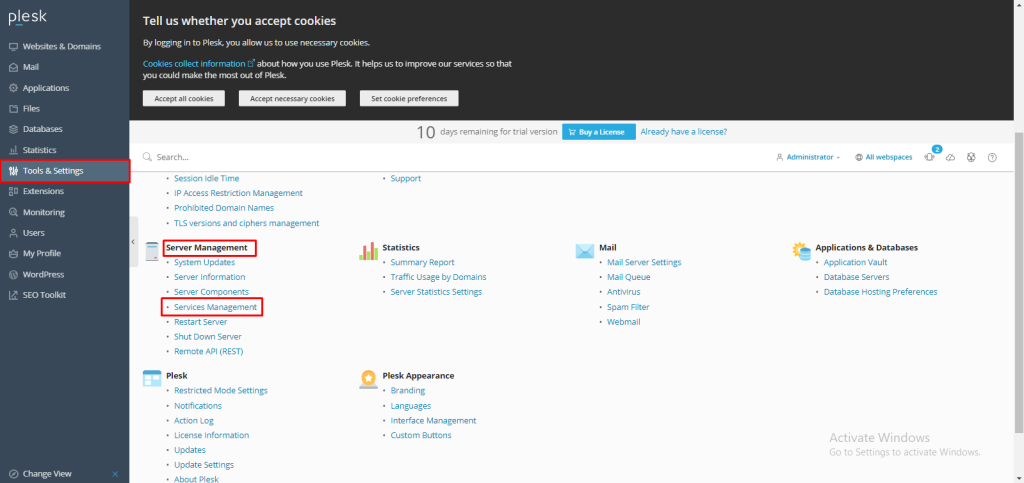
Once logged in, locate and click on Tools and Settings in the left sidebar. This section contains various administrative tools for managing your server. From there, find and select Services Management under the Server Management category.
Tips: Familiarize yourself with other tools available under Tools and Settings, as they can be useful for server maintenance and optimization.
-
Step 3: Manage Services
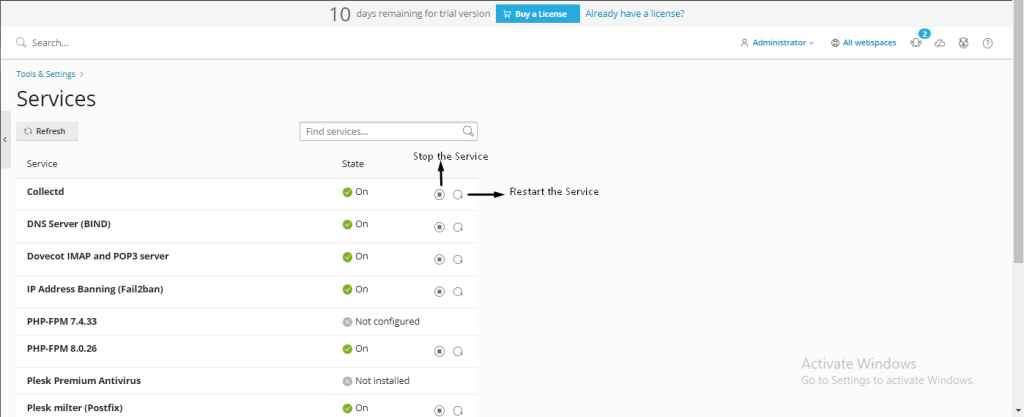
In the Services Management interface, you will see a list of all system services running on your server. Each service has buttons to start, stop, or restart it. To manage a specific service, simply click the desired action button next to its name.
Tips: Before stopping or restarting a service, ensure that it is safe to do so. For example, stopping the Apache web server will make your website inaccessible until you start it again. Always check the status of services before making changes.

Note: If you encounter any issues managing services through Plesk, consider reaching out to Internetport support for assistance. They can provide guidance and help resolve any problems you might face.