Account suspension is the usual protocol for handling users who breach resource limits. Admins need to reactivate hosting for such users, either after resetting limits or for other reasons. With WHM (Web Host Manager), you can unsuspend all accounts that have exceeded their bandwidth—referred to as bandwidth exceeders. This process not only helps in reactivating the services but also ensures that your server resources are managed effectively.
How to Do It
-
Step 1: Log in to WHM
To begin, you need to log in to your WHM root account. Open a web browser and enter the URL provided by your hosting provider, typically in the format of https://yourserver.com:2087 or https://yourserverIP:2087. Enter your username (usually "root") and password when prompted.
-
Step 2: Navigate to Account Functions
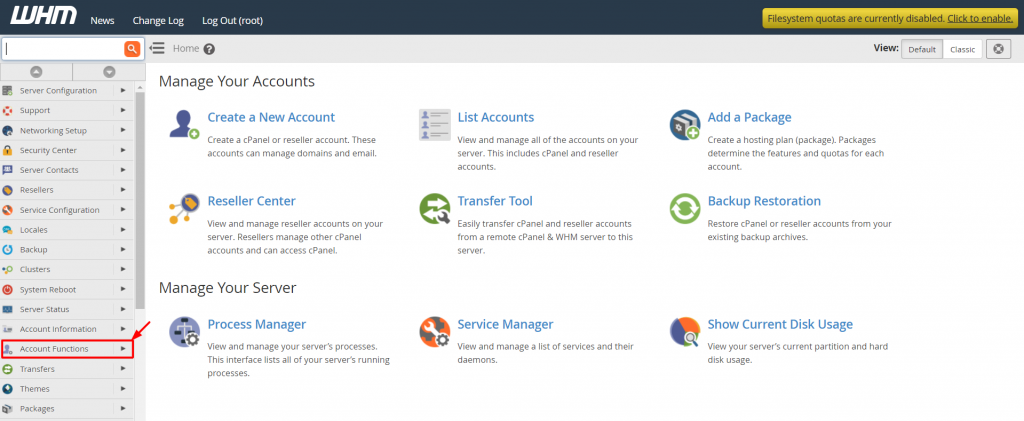
Once logged in, you'll be greeted with the WHM dashboard. On the left-hand side, locate and click on the "Account Functions" option in the menu. This section contains various tools for managing your hosting accounts.
-
Step 3: Select Unsuspend Bandwidth Exceeders
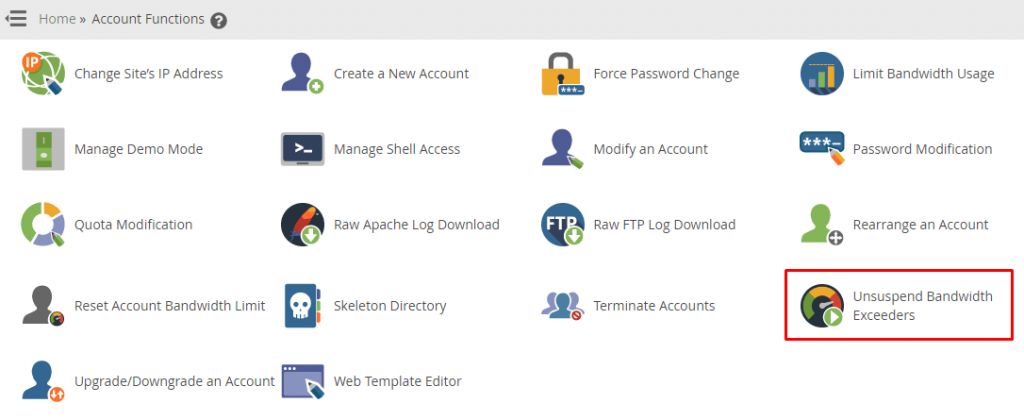
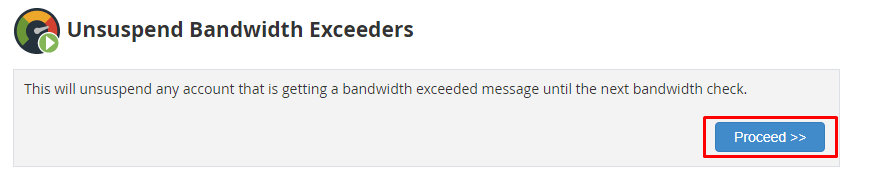
In the "Account Functions" section, scroll down to find and click on "Unsuspend Bandwidth Exceeders." This option is specifically designed to unsuspend accounts that have exceeded their allocated bandwidth. A confirmation alert will appear stating, "This will unsuspend any account that is receiving a bandwidth exceeded message until the next bandwidth check."
It's important to understand that this action will unsuspend the accounts immediately, but they may be suspended again if they exceed their bandwidth limits before the next check.
-
Step 4: Proceed with Unsuspension
To confirm your decision and proceed with unsuspending the bandwidth exceeders, click on the "Proceed >>" button. This action will automatically lift the suspension on all accounts identified by WHM as Bandwidth Exceeders.
After clicking "Proceed," you will be redirected to a page that confirms the unsuspension of the accounts. It's advisable to monitor these accounts closely in the coming days to ensure they do not exceed their limits again.
Tips:
- Before unsuspending, consider reviewing the bandwidth usage reports for each account to understand why they exceeded their limits.
- Communicate with your customers whose accounts are being unsuspended. Provide them with guidance on how to manage their bandwidth usage more efficiently.
- Set up alerts in WHM to notify you when an account is approaching its bandwidth limit, allowing for proactive management.