This guide shows you how to enable ionCube Loader in Plesk using the CloudLinux PHP Selector. IonCube Loader is required to run PHP applications that have been encoded with ionCube, and enabling it through the PHP Selector ensures it's available for your domain.
How to Enable IonCube Loader
-
Step 1: Access Plesk
Sign in to your Plesk account by navigating to the provided URL and entering your credentials. Ensure you are logged in with an administrator or reseller account that has the necessary permissions to modify PHP settings.
-
Step 2: Open PHP Selector
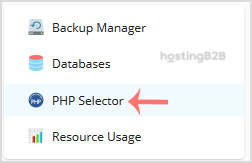
Once logged into Plesk, locate and click on "PHP Settings" from the left-hand menu. Within this section, find and click on "PHP Selector." This tool allows you to manage different versions of PHP for your domains.
-
Step 3: Navigate to Extensions
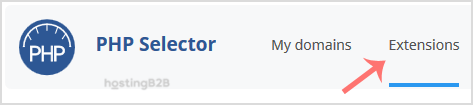
In the PHP Selector interface, you will see a list of available PHP versions. Click on the version that your domain is currently using or the one you wish to use with ionCube Loader. After selecting the version, look for and click on the "Extensions" tab to view additional modules.
Note: If the Extensions page displays an error related to the native PHP version, switch it to a non-native version first. You can do this by selecting another PHP version from the dropdown menu at the top of the PHP Selector.
-
Step 4: Enable ionCube Loader
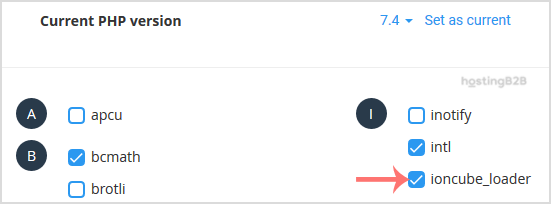
In the Extensions tab, scroll through the list to find "ioncube_loader." Check the box next to it to enable this extension. Click on the "Apply" or "Save" button at the bottom of the page to apply your changes.
After saving your changes, a confirmation message will appear indicating that the ionCube Loader module has been successfully enabled. This message confirms that your domain is now ready to run applications encoded with ionCube.

Tips:
- Ensure that the PHP version you are using is compatible with ionCube Loader. You can check compatibility on the ionCube website.
- If you encounter any issues enabling ionCube Loader, consult the Plesk logs or contact Internetport support for assistance.
- After enabling ionCube Loader, test your application to ensure it runs correctly without errors.