This guide shows you how to modify database user privileges in Plesk Panel. You'll learn how to access the User Management interface and adjust permissions for data access and structure access, ensuring your databases are secure while granting necessary permissions to users.
How to do it
-
Step 1: Log in to Plesk
To begin, access your Plesk account by navigating to
server-IP:8880in your web browser. Enter your server username and password when prompted. Ensure that you are using a secure connection (HTTPS) for logging into the panel. -
Step 2: Navigate to User Management
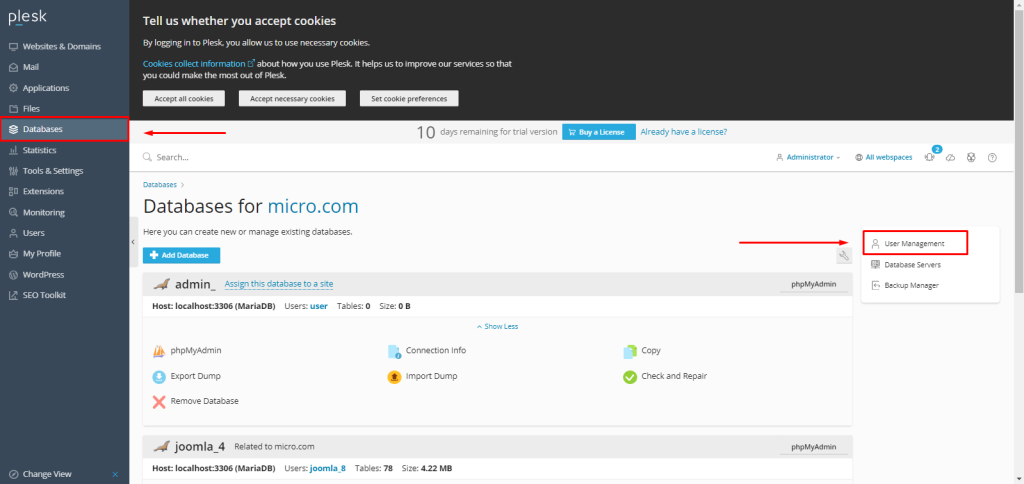
Once logged in, locate the left sidebar and click on the Databases menu. From there, select User Management. This section allows you to view all database users associated with your account.
-
Step 3: Select the database user
In the User Management interface, you will see a list of all database users. Click on the name of the user whose privileges you wish to modify. This action will take you to a detailed view of the user's current settings and permissions.
-
Step 4: Adjust privileges and save
The next step involves adjusting the user's privileges. The interface is divided into two main sections: Data Access and Structure Access. In the Data Access section, you can specify whether the user can perform actions such as SELECT, INSERT, UPDATE, DELETE, etc., on the database tables. In the Structure Access section, you can grant permissions for actions like CREATE, DROP, ALTER, INDEX, etc., which affect the structure of the database itself.
After selecting the appropriate privileges, scroll down to the bottom of the page and click the OK button to save your changes. It's important to ensure that you only grant the minimum necessary permissions required for the user to perform their tasks, which helps maintain the security of your databases.



Tips:
- Always ensure you have backups of your databases before making changes to user privileges.
- If you're unsure about a specific privilege, it's better to consult with a database administrator or developer.
- Regularly review and update user permissions as roles and responsibilities change within your organization.