Custom emails are a vital hosting feature, empowering users to create and manage multiple email accounts for their domain. This functionality is easily accessible through a control panel like Plesk. With Plesk, deleting or removing email accounts is a straightforward process. It's important to ensure that you have backed up any necessary data from the email account before deletion, as this action is irreversible.
How to Remove an Email Account
-
Step 1: Log in to Plesk
To start, open your web browser and navigate to the login page of your Plesk control panel. Enter your username and password to log in. If you have forgotten your credentials, use the "Forgot Password" feature to reset it. Once logged in, you will be directed to the main dashboard.
-
Step 2: Navigate to Mail
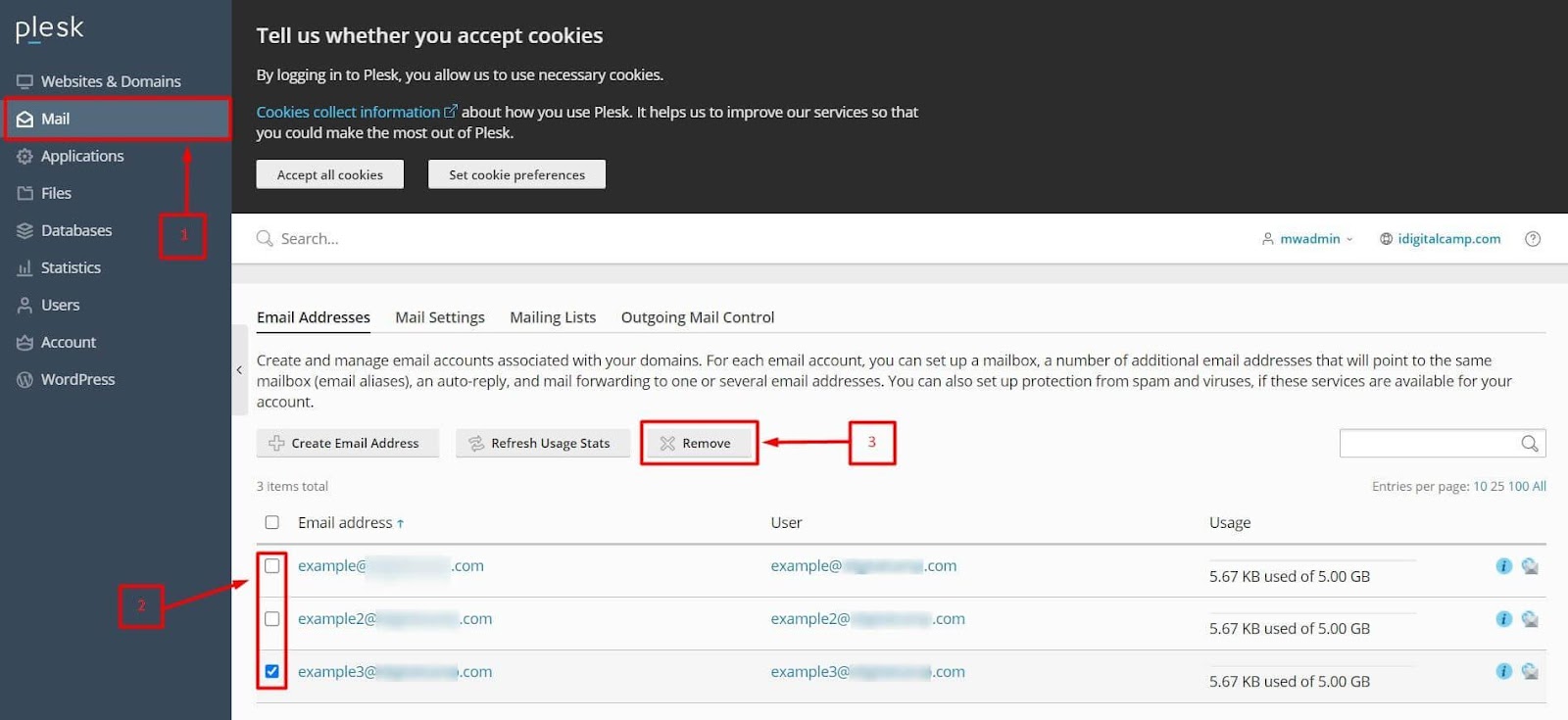
In the left-hand navigation menu, locate and click on the Mail option. This section of Plesk is dedicated to managing all email-related settings and accounts associated with your domain. Upon clicking, you will see a list of all active email accounts listed under this domain.
-
Step 3: Select Email Accounts
Find the email account(s) that you wish to remove from your Plesk panel. Click on the checkbox next to each account you want to delete. If you need to select multiple accounts, simply click on their respective checkboxes. This step allows you to manage several email accounts simultaneously.
-
Step 4: Click Remove
After selecting the desired email account(s), look for the Remove button, usually located at the top or bottom of the list. Clicking this button will initiate the deletion process. A confirmation dialog box will appear to ensure that you do not accidentally remove any accounts.
-
Step 5: Confirm Deletion
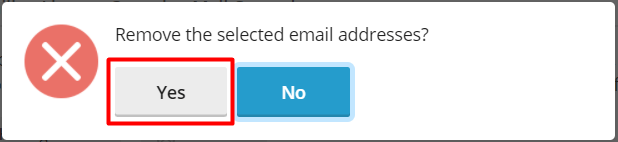
In the confirmation dialog, you will be asked to confirm your decision to delete the selected email account(s). Click on the Yes button to proceed with the deletion. Be cautious at this step as there is no undo option once the accounts are removed.
Once you confirm, the selected email account(s) will be permanently removed from your Plesk panel. It's advisable to double-check that no important emails are left in the account before proceeding with deletion.
Tips:
- Always ensure you have backups of any critical data or emails before deleting an email account.
- If you need to restore a deleted email account, contact your hosting provider as they may be able to recover it for you within a certain timeframe.
- To prevent accidental deletions, consider disabling the "Remove" button in Plesk if available, or ensure that you are cautious when performing deletion actions.