Restarting your server through Plesk is a straightforward process that administrators can perform to apply configuration changes or troubleshoot issues. This guide walks you through the steps to safely restart your private server using the Plesk control panel. It's important to note that restarting your server will temporarily interrupt services, so it's best to schedule this during off-peak hours to minimize impact on users.
How to Restart Your Server
-
Step 1: Log in to Plesk
Access Plesk using your administrator credentials. Ensure you have the correct URL for your Plesk control panel, which typically looks something like
https://your-server-ip-address:8443. Enter your username and password when prompted. -
Step 2: Navigate to Tools & Settings
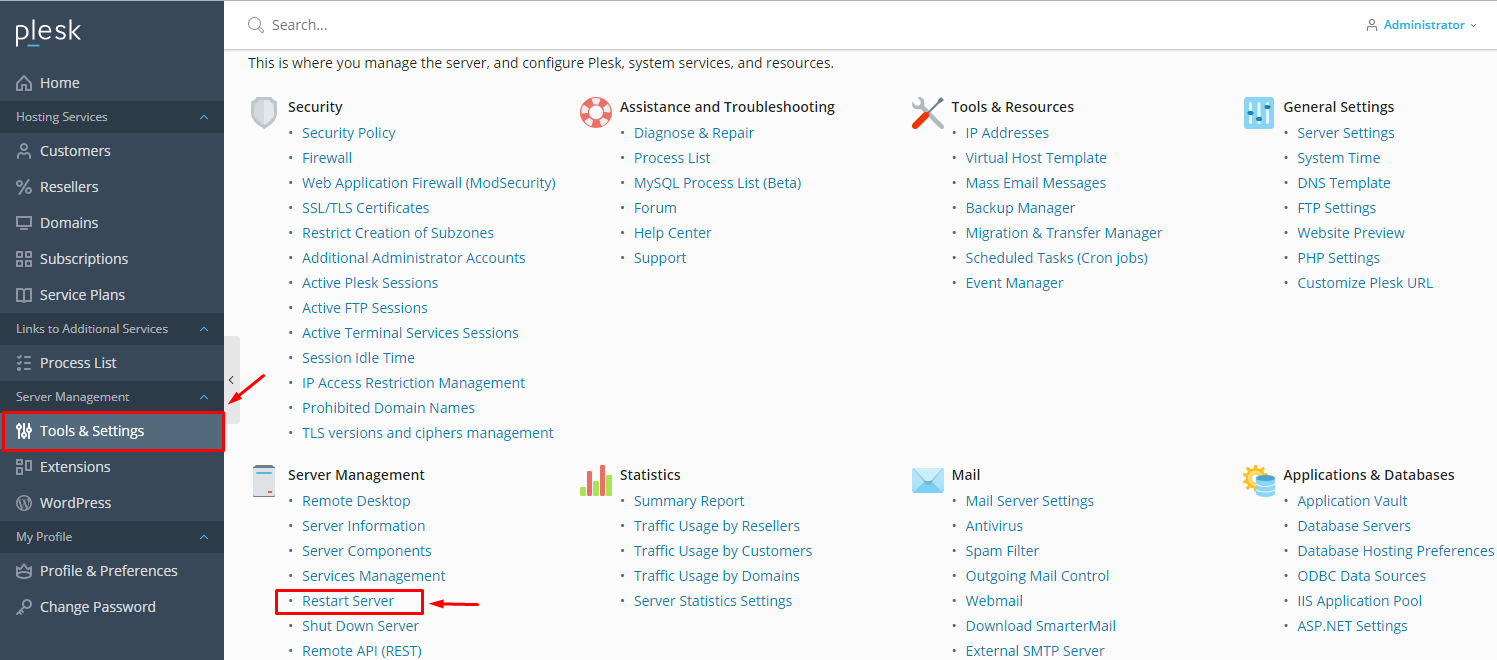
Once logged in, you'll see a side menu on the left-hand side of the Plesk interface. Click on "Tools & Settings" to access various server management options.
-
Step 3: Access Server Management
In the Tools & Settings section, look for the "Server Management" category and click on it. You will see several options related to your server's performance and maintenance. Click on "Restart Server" to proceed.
-
Step 4: Confirm the Restart
A confirmation window will appear, asking you to confirm that you want to restart the server. This is a safety measure to prevent accidental restarts. Click "Yes" to initiate the server restart.
The restart duration may vary, taking as little as 5 minutes or more, depending on the file system check and any maintenance tasks that need to be performed during the downtime.

Additional Tips
- Communicate with Users: Before restarting your server, it's a good practice to inform your users about the scheduled downtime. This helps manage their expectations and reduces potential frustration.
- Check Logs: After the restart, check the server logs in Plesk to ensure that all services are running correctly. Look for any error messages or warnings that might indicate issues.
- Test Services: Once the server is back online, test your websites and email services to confirm everything is functioning as expected.
By following these steps and tips, you can safely restart your server through Plesk with minimal disruption to your services.