Webuzo allows you to configure remote MySQL access, enabling external applications and services to connect to your website's database. This guide walks you through adding a remote access host to your MySQL configuration in Webuzo, ensuring that only authorized hosts can access your databases securely.
How to Add a Remote MySQL Access Host
-
Step 1: Log in to Webuzo
Access your Webuzo panel using your user account credentials. Open your web browser and navigate to the URL provided by Internetport.se for your Webuzo control panel. Enter your username and password when prompted.
-
Step 2: Navigate to Remote MySQL Access
In the Webuzo dashboard, locate the "Database" section on the left-hand menu. Click on it to expand the options, then select "Remote MySQL Access." This will take you to a page where you can manage which hosts are permitted to access your MySQL databases.
You will see a list of current Access Hosts that have been configured to connect to your MySQL databases.
-
Step 3: Click Add Host
To add a new remote access host, look for the "Add Host" button at the top right corner of the Remote MySQL Access page and click on it. This action will open a configuration window where you can specify the details for the new remote access host.
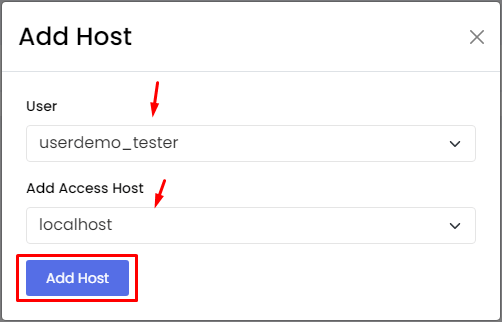
The "Add Host" window will appear, allowing you to specify the details for the remote access host.
-
Step 4: Configure the Access Host
In the User field, select the database user you want to grant remote access to. This is typically a specific user that has been created for your website or application. In the "Add Access Host" field, enter the hostname or IP address that should be allowed to connect to the MySQL server. It's crucial to use a specific IP address or a fully qualified domain name (FQDN) for security reasons.
For example, if you want to allow access from an application hosted on another server with the IP address 192.168.1.50, you would enter "192.168.1.50" in the "Add Access Host" field.
Tip: If your remote host's IP address may change (e.g., a dynamic DNS setup), consider using an FQDN instead of a static IP address to ensure consistent access.
-
Step 5: Save the Configuration
After entering all necessary information, click "Add Host" to save your settings. Webuzo will process the request and update the MySQL configuration accordingly.
You will receive a success message confirming that Webuzo has successfully added the new remote MySQL access host to the list. It's a good practice to test the connection from your remote application to ensure everything is configured correctly.