This guide explains how to modify database user privileges in DirectAdmin's MySQL Management interface. Adjusting privileges allows you to control what actions a database user can perform, such as reading, writing, or modifying database structures. Properly managing these permissions is crucial for maintaining the security and integrity of your databases.
How to Modify Database User Privileges
-
Step 1: Access MySQL Management
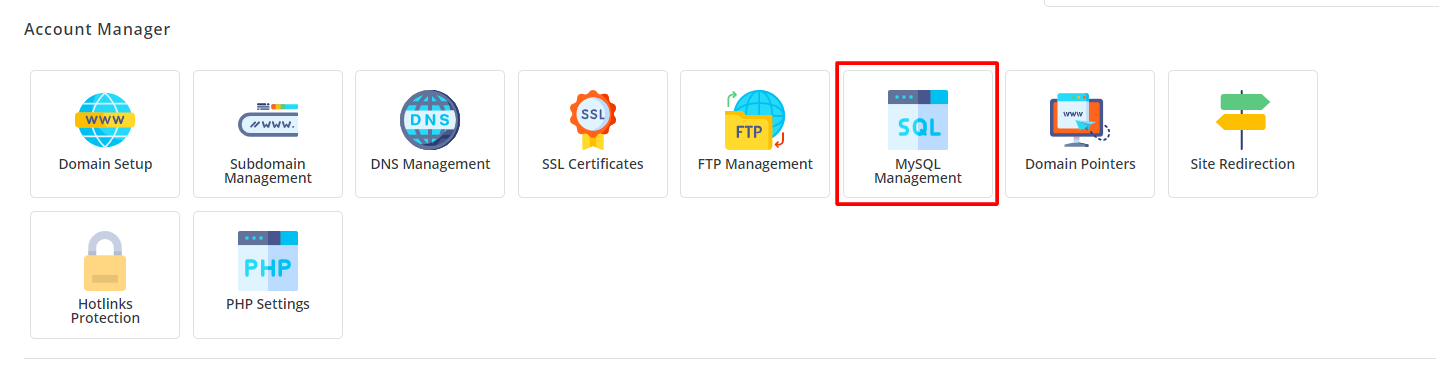
Log in to your DirectAdmin account. In the Account Manager section, select the MySQL Management icon or enter "MySQL Management" in the Navigation Filter box to reveal the option. Click on it to proceed.
Once logged in, you will be greeted with the MySQL Management interface where you can manage your databases and users.
-
Step 2: Select the Database
Navigate to the "Database" section and select the database for which you want to adjust privileges. You will see a list of all databases associated with your account. Click on the name of the database to proceed.
Choosing the correct database is essential as you will be modifying privileges for users associated with this specific database.
-
Step 3: Open Privilege Modification
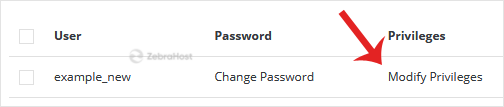
In the "User List" section, locate your database users. Click on Modify Privileges to make adjustments. This will take you to a page where you can specify what actions each user can perform on the selected database.
Here, you can fine-tune the permissions for each user. Be cautious when granting privileges to ensure that users have only the access they need.
-
Step 4: Adjust and Save Privileges
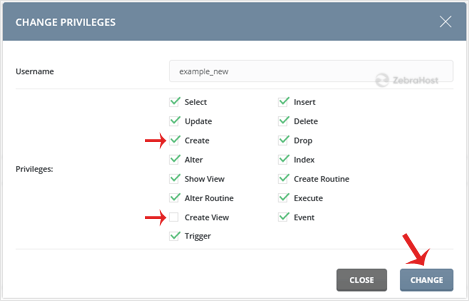
Adjust privileges as per your requirements, then click the Change button. You can select specific permissions such as SELECT, INSERT, UPDATE, DELETE, CREATE, DROP, etc., based on what you want to allow or restrict for each user.
The modifications to your database user privileges have been applied successfully. It's a good practice to double-check the permissions after making changes to ensure they are set correctly.

Tips:
- Always ensure that you are logged in with an account that has sufficient privileges to modify user permissions.
- Be cautious when granting ALL PRIVILEGES, as this can pose a security risk if not managed properly.
- Regularly review and update user privileges to match the current needs of your applications and users.
If you encounter any issues or need further assistance with modifying database user privileges, please contact our support team for help.