Log processing schedules in WHM determine how frequently the server analyzes and updates statistics from web server logs. Adjusting this schedule allows you to balance between real-time statistics accuracy and server resource usage, ensuring optimal performance for your hosting environment.
How to do it
-
Step 1: Access WHM root account
Log in to your WHM root account using the provided URL and credentials. Ensure you are logged in as the root user or a reseller with the necessary permissions.
Tips:
- Use a secure connection (https) to protect your login information.
- If you're unsure about your credentials, contact your hosting provider's support team.
-
Step 2: Navigate to Server Configuration
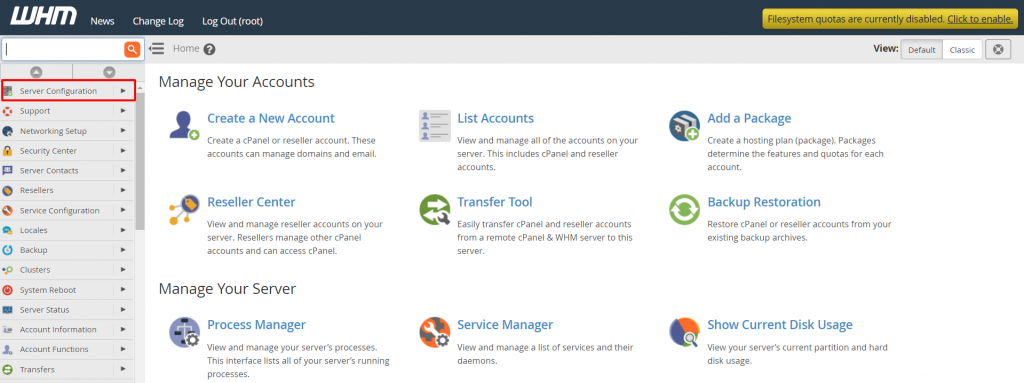
In the WHM interface, locate and click on Server Configuration from the left-hand navigation menu. This section contains various settings related to your server's configuration.
-
Step 3: Open Statistics Software Configuration
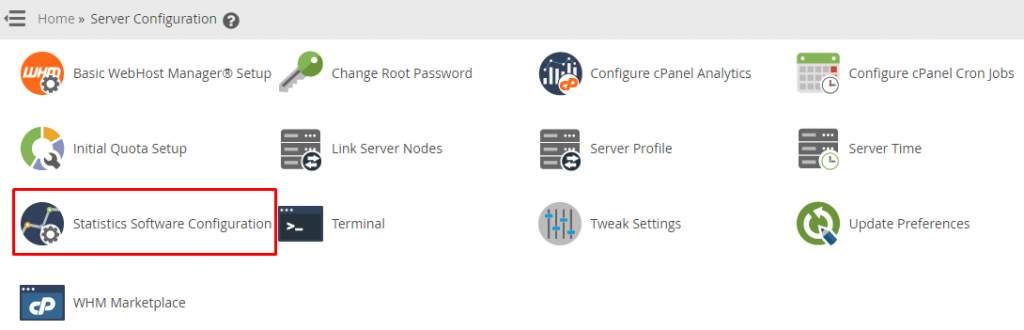
Within the Server Configuration section, find and click on Statistics Software Configuration. This page allows you to configure settings related to how log files are processed and statistics are generated.
The Statistics Software Configuration interface will appear, displaying various options for configuring your statistics software.
-
Step 4: Adjust the log processing schedule
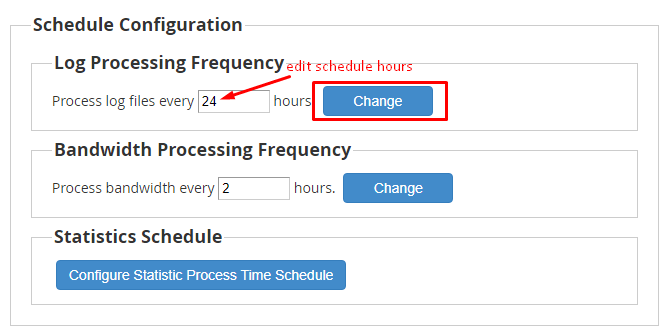
Scroll down to the Schedule Configuration section. Here, you'll find the Log Processing Frequency settings. You can adjust how often the server processes log files by changing the minute and hour fields. For example, setting it to run every 2 hours would mean entering "0" in the minutes field and "*/2" in the hours field.
Tips:
- Consider the traffic on your server when choosing a frequency. Higher traffic may require more frequent processing for accurate statistics.
- Avoid setting the schedule during peak usage times to minimize impact on server performance.
-
Step 5: Save the changes
After adjusting the log processing frequency, click on the Change button at the bottom of the page to save your settings. WHM will immediately update the schedule for processing log files on the server.
Once saved, your server will begin processing log files according to the new schedule. You can verify that the changes have been applied by checking the cron jobs or reviewing the logs.