A parked domain serves as an alias or secondary domain directing to a user's primary domain. Visitors to a parked domain are automatically redirected to the primary website. This guide demonstrates how to park a domain on your WHM server, ensuring that you can manage multiple domains efficiently without setting up separate hosting packages for each one.
How to Park a Domain
-
Step 1: Sign in to WHM
To begin, open your web browser and navigate to the WHM login page. Enter your username and password provided by your hosting provider. It's crucial that you use a secure connection (https) to protect your credentials.
-
Step 2: Navigate to DNS Functions
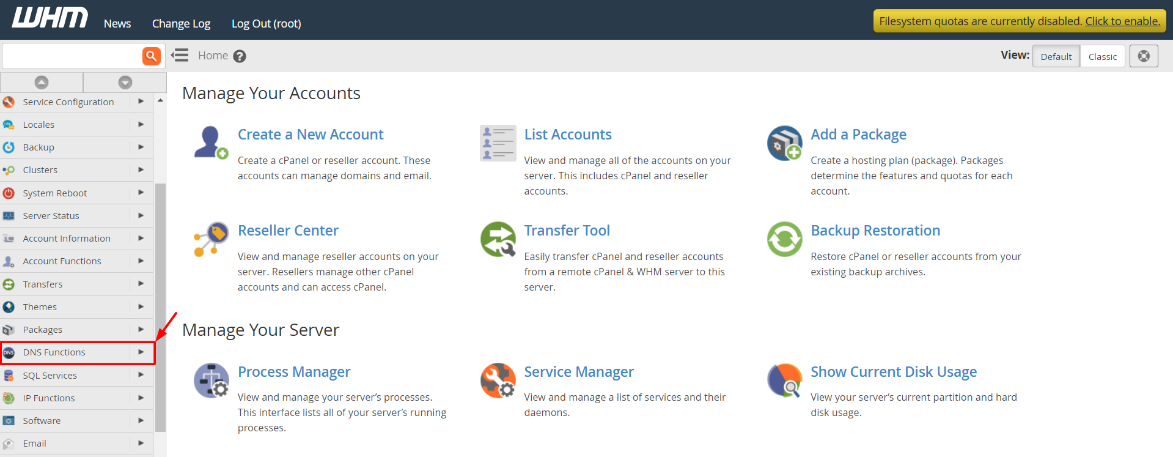
Once logged in, locate the DNS Functions section on the main dashboard. This area contains various tools related to Domain Name System management, including parking domains. Click on DNS Functions.
-
Step 3: Select Park a Domain
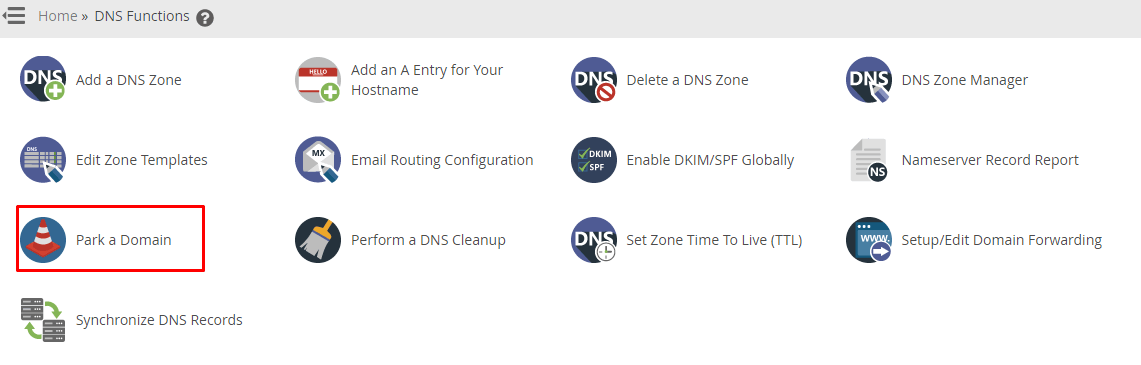
In the DNS Functions menu, find and click on the Park a Domain option. This will open the domain parking interface where you can specify which domain should be parked and where it should point to.
-
Step 4: Configure the parked domain
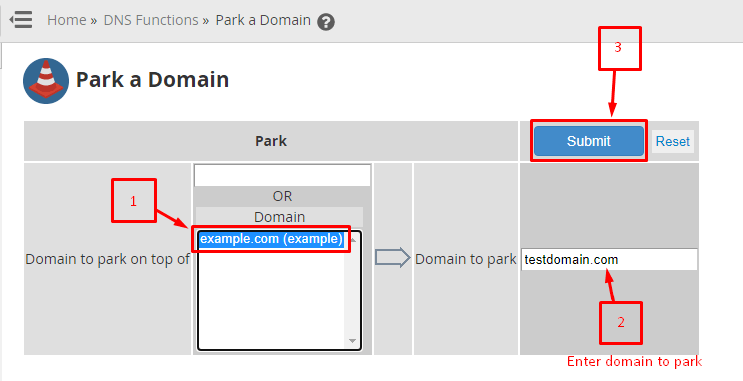
In the Park a Domain interface, you will need to fill in some details:
- Select the primary domain from the Domain to park on top of dropdown menu. This is the main website where visitors will be redirected when they visit the parked domain.
- In the Domain to park field, enter the alias or additional domain you wish to park. Ensure that this domain is already registered and points to your server's nameservers.
- Optionally, you can specify a subdomain if needed. This step is optional and typically used for more complex setups.
- Click the Submit button to process your request.
-
Step 5: Verify success
After submitting your request, WHM will process the domain parking and display a confirmation message indicating that the domain has been successfully parked. It's important to note that DNS changes can take some time to propagate across the internet, so it may not be immediately accessible.
Note: Registering the domain name as soon as possible after parking is recommended. This ensures that the domain is active and ready for visitors before they attempt to access it.
Tips:
- Ensure that the DNS settings of your parked domain are correctly pointing to your server's nameservers. This step is crucial for proper redirection.
- Parked domains do not require separate hosting packages, but they must be associated with an account on your WHM server.
- If you encounter any issues during the parking process, consult the WHM documentation or contact your hosting provider's support team for assistance.