As a reseller, you may need to prompt users to change their cPanel password for security reasons—such as after detecting malware or compromised scripts—or as part of routine password rotation. WHM allows you to enforce a password change that will be required at the user's next cPanel login.
How to Force a Password Change
-
Step 1: Log in to WHM
Access your WHM interface using your reseller credentials. Ensure you have the necessary permissions to manage user accounts. If you encounter any issues logging in, check that your IP address is whitelisted and that two-factor authentication (if enabled) is correctly configured.
-
Step 2: Navigate to Account Functions
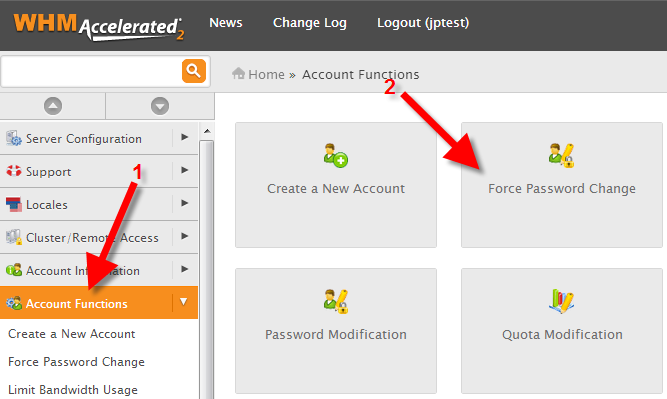
In the left-hand menu, locate and click on Account Functions. This section contains various tools for managing your reseller accounts. Make sure you are in the correct context—some functions may vary based on your WHM version or configuration.
-
Step 3: Open Force Password Change
Click on the Force Password Change button. This tool allows you to enforce password changes for one or more accounts. Ensure that your browser has JavaScript enabled, as it may be required for some WHM functionalities.
-
Step 4: Select Accounts and Submit
Locate the account(s) you want to force a password change for. The list will display all accounts under your reseller account. Check the box under the Forced? column for each account, or use Select All if you wish to apply this requirement to all managed accounts.
Before submitting, double-check that you have selected the correct accounts to avoid unnecessary inconvenience for your users. Click the Submit button. A confirmation message will appear in the bottom right corner of the WHM interface, indicating that the action was successful.
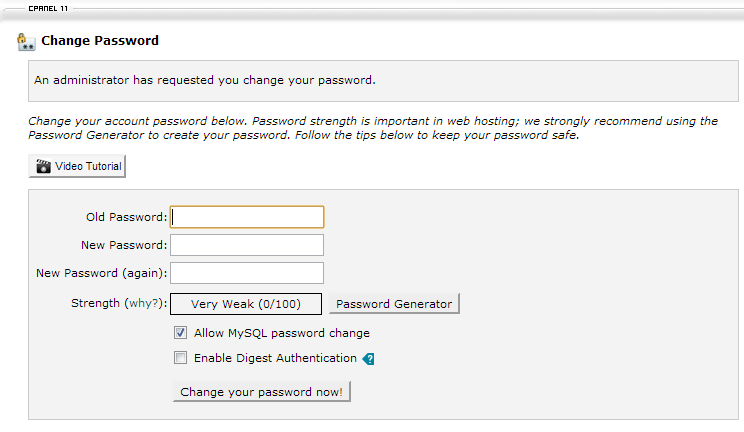
The next time the user logs into cPanel, they will see a notification stating: "An administrator has requested you change your password." This ensures that users update their credentials promptly, enhancing security for your hosting environment.
Tips:
- Consider informing your users in advance about the upcoming password change to minimize disruption.
- Ensure that you have a reliable method of communication with your users, such as email or a support ticket system, to address any questions or issues they may encounter during the process.
- Regularly review and update security policies to protect against potential threats and vulnerabilities.