This guide explains how to unsuspend hosting accounts in WHM (Web Host Manager) that have been automatically suspended for exceeding their bandwidth limits. This is typically needed after bandwidth quotas reset at the start of a new billing period, allowing administrators to restore service for affected accounts. Before proceeding, ensure you have administrative access to your WHM control panel and that you understand the implications of unsuspending these accounts.
How to Unsuspend Bandwidth Exceeders
-
Step 1: Access WHM
Log in to your WHM control panel using your administrator credentials. You can usually access this by visiting a URL similar to
https://yourserver.com:2087. Enter your username and password when prompted. -
Step 2: Navigate to Account Functions
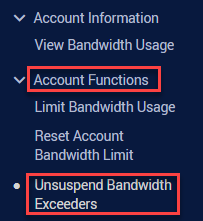
In the left sidebar, locate the Main menu. Click on it if it's not already expanded. Then, find and click on the Account Functions section. Alternatively, you can use the search bar at the top of WHM to type "Unsuspend Bandwidth Exceeders" and select it from the dropdown results.
-
Step 3: Select Unsuspend Bandwidth Exceeders
Within the Account Functions section, click on the Unsuspend Bandwidth Exceeders option. This will take you to a page where WHM lists all accounts that have been suspended due to exceeding their bandwidth limits.
-
Step 4: Confirm the Action
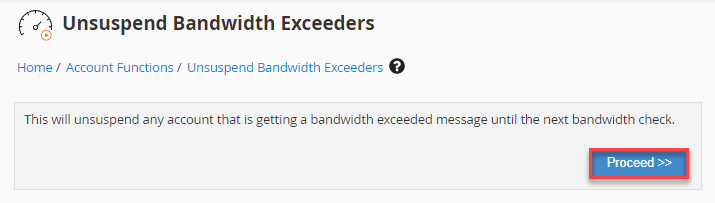
On the confirmation page, you will see a list of all accounts that are set to be unsuspended. Review this list carefully to ensure no unintended accounts are included. Once you're satisfied, click the Proceed button to unsuspend all listed accounts. This action is irreversible for the current session.
-
Step 5: Verify Completion
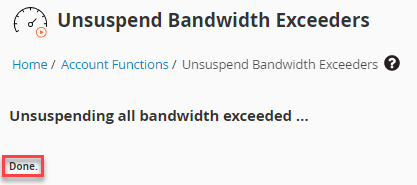
After clicking Proceed, WHM will process the unsuspension of the accounts. You will receive a confirmation message indicating that the selected accounts have been successfully unsuspended and restored to normal operation.
All accounts that were suspended due to bandwidth overages will now be automatically unsuspended and restored to normal operation. It's a good practice to monitor these accounts for any further issues or potential overuse of bandwidth in the upcoming billing cycle.