This guide shows how to disable password protection for the site statistics page in Plesk, allowing unrestricted access to your website's statistical data without requiring FTP credentials. This can be particularly useful if you want to share access with clients or team members who do not have FTP login details.
How to do it
-
Step 1: Log in to Plesk
Access your Plesk control panel with your administrator credentials. Ensure you have the necessary permissions to make changes to hosting settings.
-
Step 2: Navigate to Websites & Domains
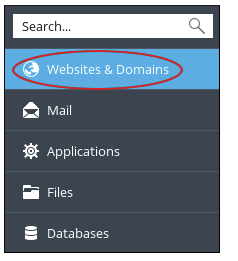
In the left sidebar, click on Websites & Domains. This section lists all the domains and subdomains associated with your Plesk account.
-
Step 3: Open Hosting Settings
Find the domain for which you want to modify the statistics access settings. Click on the domain name, and then click on Hosting Settings. This will take you to a detailed configuration page for that specific domain.
-
Step 4: Find the statistics protection setting
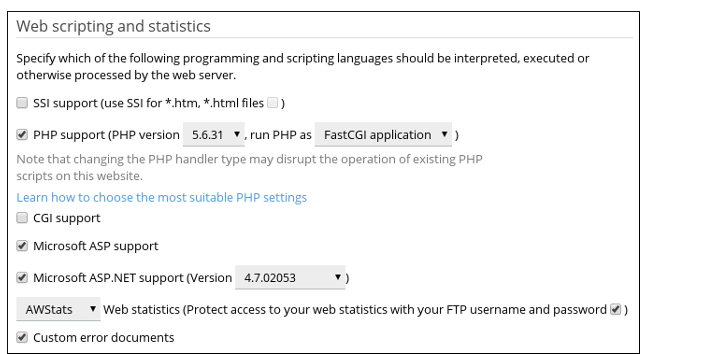
Scroll down the Hosting Settings page until you reach the Web scripting and statistics section. Here, you will find options related to web statistics and their access settings.
-
Step 5: Disable password protection
Look for the option labeled Protect access to your web statistics with your FTP username and password. This checkbox, when selected, requires users to enter their FTP credentials to view the statistics page. To disable this requirement, simply uncheck (deselect) the box.
-
Step 6: Save changes
After making your changes, click on the OK button at the bottom of the page to save them. It's important to ensure that all settings are correctly configured before saving.
Once saved, users will be able to access the statistics page for the domain without needing to enter any FTP credentials. This change applies immediately, so you can verify it by trying to access the statistics page directly in a new browser window or incognito mode.
Tips:
- Be cautious when removing password protection as this will make your site's statistics publicly accessible. Ensure that sharing this information is appropriate for your use case.
- If you need to re-enable password protection in the future, simply follow these steps again and check the box to protect access with FTP credentials.