Plesk allows you to create a staging environment where you can test website changes, updates, and new features before deploying them to your live site. By cloning your production website to a subdomain or subdirectory, you can safely experiment with modifications and ensure everything works correctly before making changes public.
How to create a staging site
-
Step 1: Access Websites & Domains
Log in to the Plesk control panel using your credentials. Once logged in, navigate to the left sidebar and click on "Websites & Domains." This section provides an overview of all domains and subdomains associated with your account.
-
Step 2: Create a subdomain or subdirectory
To create a staging environment, you need to set up either a subdomain (e.g., stage.example.com) or a subdirectory (e.g., example.com/stage). In the "Websites & Domains" section, look for the "Add Subdomain" button if you prefer a subdomain, or find the domain you want to add a subdirectory to and click on its name. Then, locate and click on "Add Subdirectory." Choose your preference based on how you wish to organize your staging environment.
-
Step 3: Configure the staging location
Once you've chosen between a subdomain or subdirectory, fill in the required details. For a subdomain, enter the name and select the domain from the dropdown menu. For a subdirectory, specify the directory name within your main domain. The document root is typically automatically filled based on your input but can be adjusted if necessary. Click "OK" to create the staging location.
-
Step 4: Clone the website
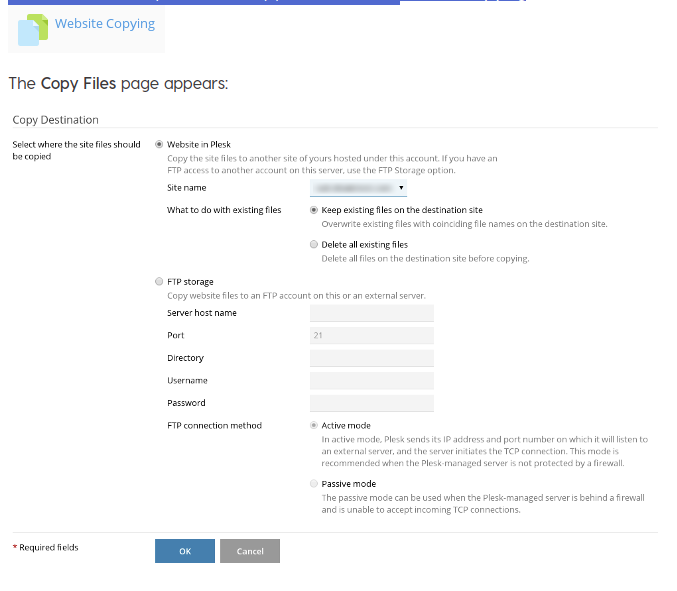
To clone your live site to the newly created staging area, locate the "Website Copying" or "Clone Website" option in your Plesk version. This feature allows you to duplicate all files and settings from your production site to the staging environment. Click on this option, select the source website (your main domain), and choose the destination as the subdomain or subdirectory you created earlier. Ensure that you check the boxes for "Copy content" and "Copy databases" if applicable. Finally, click "OK" to start the cloning process.
-
Step 5: Make and test changes
After your staging site is successfully cloned, you can begin making changes without affecting your live website. Update plugins, themes, or extensions as needed through the Plesk interface or by accessing the files directly via File Manager. Thoroughly test all new features and updates to ensure they function correctly in the staging environment. Once satisfied with the results, you can safely deploy these changes to your production site.
Tips for successful staging:
- Regularly update your staging site to mirror any recent changes made to the live site.
- Use a separate database for your staging environment to prevent accidental data loss or corruption.
- Consider using version control systems like Git to manage and track changes more efficiently.